Email Marketing with Mailchimp: A Guide for Beginners
Email Marketing with Mailchimp: A Guide for Beginners
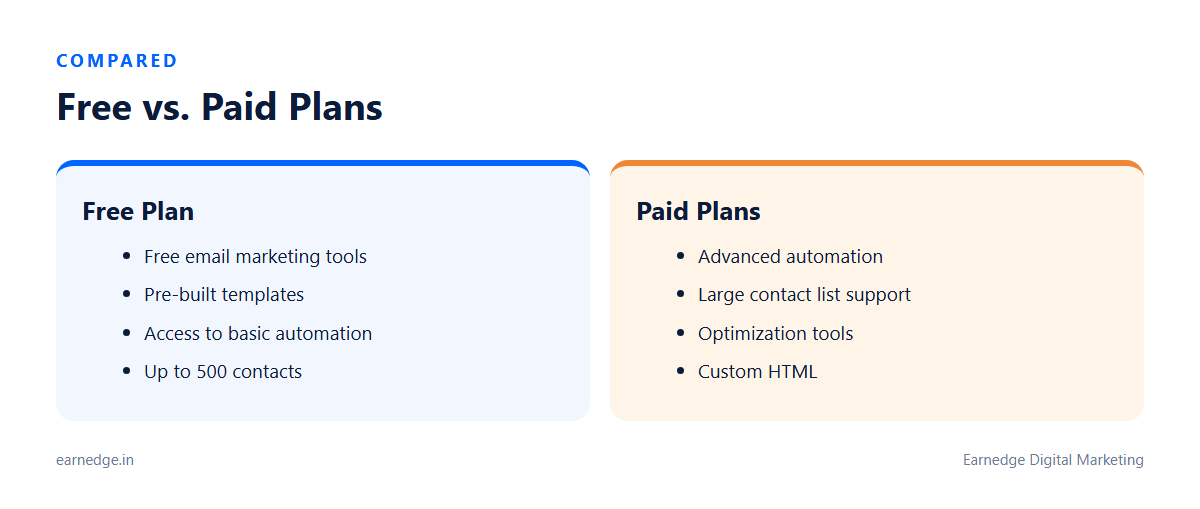
Mailchimp is an email marketing platform that allows users to create, send, and track email campaigns. It allows businesses to segment customers, automate messaging, and use analytics to improve marketing campaigns. Mailchimp provides templates and tools for creating emails. The plan offers basic marketing automation flows and email campaign creation. You can even start with a free plan to access powerful tools.
Getting Started with Mailchimp
The first step in sending an email campaign through Mailchimp is creating an email. Mailchimp offers various plans, including a free option with helpful tools. After creating your account, you’ll need to build an audience by adding or collecting contacts. You can also create signup forms to allow customers to easily join your email list.
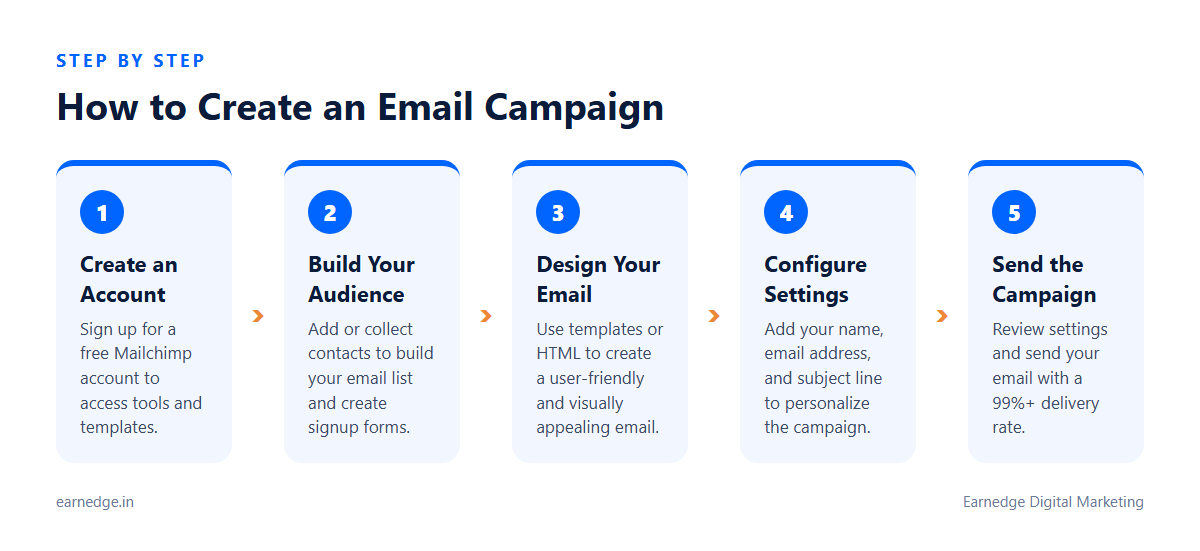
To use Mailchimp for email marketing, start by creating an account. Recipients can be all subscribers or specific segments based on goals and preferences. Mailchimp provides templates and tools to help create user-friendly emails. When creating an email, you’ll need to add recipients, write a subject line, and include your name and email address. You can choose to send to all subscribers or specific segments. Finally, review your campaign settings and send it out.
Creating Your First Campaign
Mailchimp offers free email marketing tools. The initial step involves creating the email itself. Next, you’ll select your recipients. You can choose to send to your entire audience or target specific segments based on your goals.
After determining recipients, include your name and email address, and write a subject line. Mailchimp provides a variety of templates, designs, and tools to help you create a user-friendly email. You can also customize emails with HTML.
Once you’ve designed your email and configured the settings, review your campaign. Then, you’re ready to send it! Mailchimp boasts a delivery rate of over 99%.
Using Segmentation to Target Your Audience
Segmentation lets you send emails that resonate with your audience. Mailchimp’s targeting tools can increase customer engagement and loyalty. Focusing on the right people with the right message through segmentation improves email marketing results.
After setting up an account, you can add contacts or collect them to build your audience. Mailchimp’s free email marketing plan includes tools to assist you. You can also create signup forms to encourage customers to join your email list.
Mailchimp offers behavioral targeting features. The platform also provides marketing automation flows. Email marketing software simplifies audience segmentation.
Automating Your Email Campaigns
Mailchimp offers strategies for boosting engagement and revenue. Automations can also increase site traffic and sales. These tools allow you to target the right audience and send personalized messages. With Mailchimp, you can organize your audience and define timing preferences and triggers.
Advanced automations are available with a plan that includes optimization tools. Mailchimp suggests ways to improve content and identifies optimal send times.
Businesses can store and manage customer data to build effective campaigns. Mailchimp’s Free plan provides access to free email marketing tools. The Free plan also includes free email marketing.
Leveraging Email Templates for Impact
Mailchimp provides a variety of expertly-designed email templates. These templates offer inspiration and can help you create visually appealing campaigns. You can choose from these pre-built options or customize them using HTML to reflect your brand. Mailchimp offers a wide variety of templates, designs, and tools that make it easy to create sleek and user-friendly emails.
Creating an email is the first step in sending an email campaign. Recipients may include all subscribers or specific segments, and you’ll need to include your name and email address. Mailchimp’s Free plan includes pre-built email templates. The platform’s email marketing software simplifies the process of creating and monitoring campaigns.
Mailchimp sends half a billion emails every day.
Analyzing Campaign Performance
Mailchimp shows ways to get more engagement and revenue. Most email marketing tools show how emails performed. Mailchimp shows ways to get more engagement and revenue. You can monitor your performance to gauge the success of your email marketing campaign.
The platform provides insights through analytics and AI. Mailchimp enables access to data about campaigns, websites, or landing pages. Shopify data can be synced to Mailchimp. Users’ connected stores can generate up to four times more orders than bulk emails.
Mailchimp provides tools for creating emails.
Saving 50% for 12 Months
Mailchimp’s Free plan enables free email marketing. Paid plans include CJB. Mailchimp also provides plans designed for businesses with large contact lists. Businesses with large contact lists can also access these plans. A one-month free trial of Mailchimp’s Premium features is available. To explore plans for large contact lists and the free trial, contact the sales team.
FAQ: What’s New in Mailchimp?
How does Mailchimp help me grow my business?
Mailchimp’s latest marketing features can accelerate business growth. Connected stores have seen up to four times more orders compared to using only bulk emails. Many campaigns lead directly to sales.
What integrations does Mailchimp offer?
Mailchimp integrates with Shopify and Google Analytics. Shopify allows you to sync customer and product data with Mailchimp. You can also promote Instagram posts within your email campaigns.
Are there new ways to collect email addresses?
Mailchimp offers popup forms, though access is currently limited. These forms are available on web browsers only.