WhatsApp Marketing Messages: How to Engage Customers
WhatsApp Marketing Messages: How to Engage Customers
WhatsApp’s Business API lets businesses send marketing messages, but strict guidelines are essential for compliance. This article details how to use WhatsApp marketing effectively, from template approval to content creation, and explains Meta’s requirements to help you avoid issues.
What Are WhatsApp Marketing Messages?
WhatsApp marketing messages allow businesses to reach customers directly through the messaging platform. These messages can boost engagement and offer valuable content. Businesses leverage the WhatsApp Business API to create meaningful customer interactions. Each message requires careful planning and approval from Meta.
Promotional WhatsApp messages can be a strong tool for increasing sales and building customer loyalty. Businesses often use them to reward returning customers with exclusive discounts. Marketing messages engage customers and build loyalty at every stage. They can help potential clients discover a business, encourage purchases, build trust, and reconnect with existing customers.
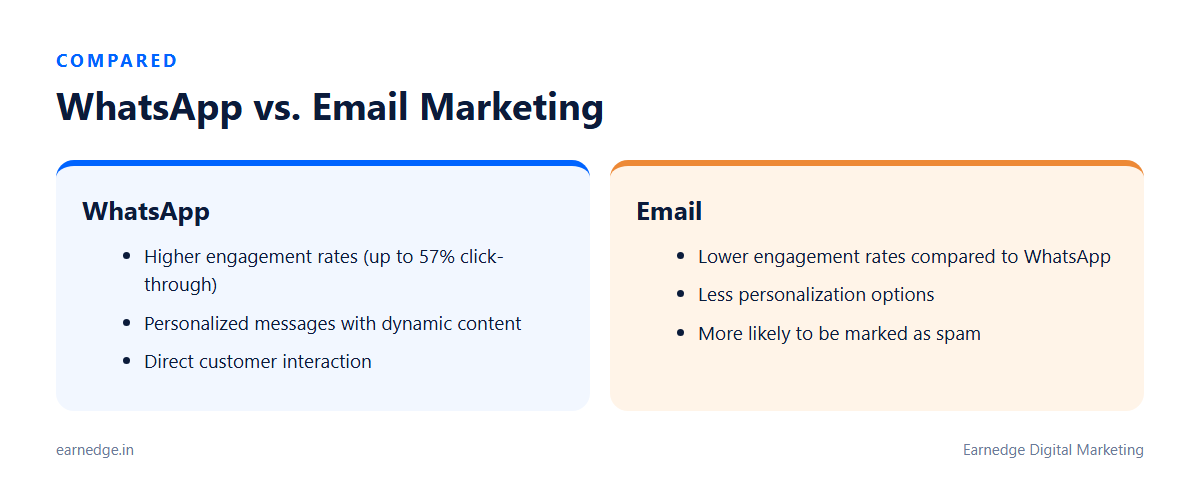
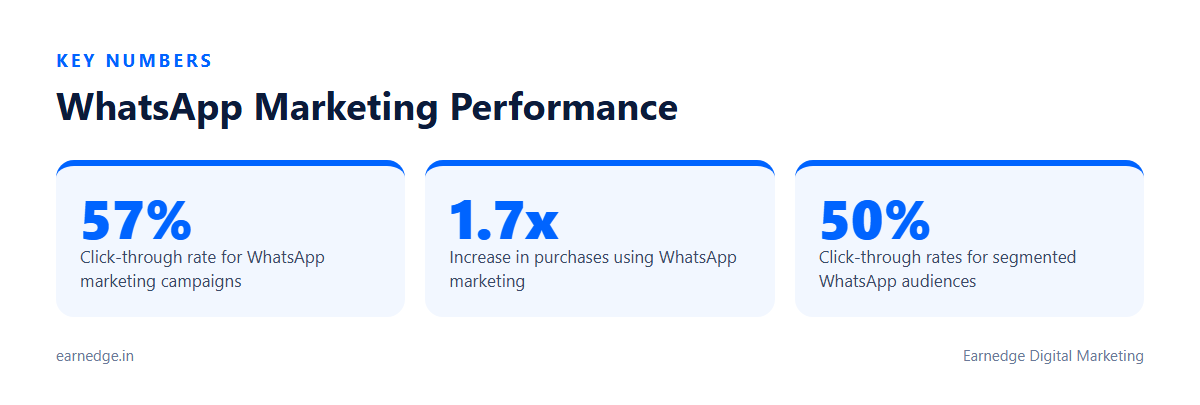
The WhatsApp Business Platform enables businesses to expand their customer engagement efforts. It can also improve return on investment compared to email, in-app notifications, and SMS messages. One business experienced a 57% clickthrough rate and a 1.7x increase in purchases using WhatsApp.
Does WhatsApp Allow Marketing Messages?
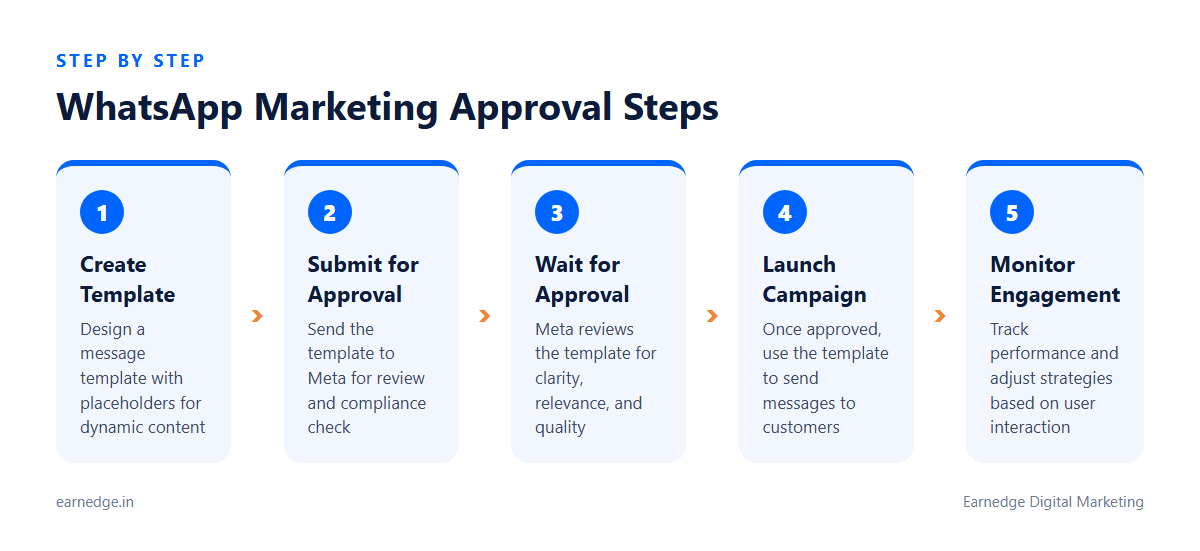
Yes, WhatsApp permits marketing messages, but only through the WhatsApp Business API. Businesses can use this to send promotional offers and updates. Following the guidelines helps ensure successful WhatsApp marketing. Meta requires approval for all message templates, a process designed to ensure clarity, relevance, and quality.
The WhatsApp Business App allows for some broadcasts, but larger promotional campaigns require API approval. Approved templates help prevent unsolicited messages. Businesses need to get user consent before sending messages to avoid being flagged as spam. Messaging limits also apply, determined by business verification status and engagement.
Why Do I Need WhatsApp’s Approval for My Message Templates?
WhatsApp requires approval for message templates to comply with anti-spam policies and enhance user experience. This process prevents businesses from sending unwanted messages, which helps improve engagement. Meta must review and approve templates before they can be used through the WhatsApp Business API. This ensures clear, relevant, and high-quality communication that aligns with WhatsApp’s policies.
Once approved, a template’s status changes to “Active – Quality Pending,” allowing you to send it. Because of this approval process, planning campaigns in advance is advisable.
Templates that violate WhatsApp’s Commerce Policy, such as those offering prohibited goods, may be rejected. Familiarizing yourself with these rules can help ensure your WhatsApp message marketing runs smoothly.
Can I Send WhatsApp Marketing Messages Without API Approval?
WhatsApp marketing messages need API approval. The WhatsApp Business App offers some broadcast functionality, but large-scale promotional messaging requires the WhatsApp Business API. Using the API means message templates are reviewed and approved by Meta before they can be sent.
Sending messages without this approval can violate WhatsApp’s policies. Businesses must get user consent and adhere to opt-in guidelines to avoid being flagged as spam. Low engagement or high block rates can also restrict messaging limits. To prevent a ban, businesses should only use WhatsApp-approved templates.
What Is {{1}} in the WhatsApp Business API Message Template?
Message templates in the WhatsApp Business API use placeholders to allow for dynamic content. They enable you to personalize messages without needing to create a separate template for each variation.
Using these placeholders allows you to tailor your message to each individual user.
The specific content that fills the placeholder depends on the data you provide when sending the message. This ensures that each recipient receives information that is pertinent to them.
What Are the Various Placeholders in the WhatsApp Business API Message Template?
Message templates in the WhatsApp Business API use placeholders to personalize messages at scale. They allow you to insert specific customer data into a pre-approved template.
Other common placeholders include dates and times.
Using placeholders ensures consistency while still allowing for tailored communication. This approach helps build owned marketing channels, rather than relying solely on paid advertising. They are essential for sending messages that feel relevant and engaging to individual recipients.
Can I Include Media in My WhatsApp Promotional Messages?
Yes, WhatsApp allows media messages like images, videos, PDFs, and audio files. However, to send these, you must use approved templates through the WhatsApp Business API. Visuals can enhance promotions, making them more engaging and potentially improving conversion rates.
WhatsApp marketing offers tools beyond simple text messages, letting you shape your campaigns. Reaching customers on a platform they already use can improve engagement and lead to successful marketing efforts.
Before sending, familiarize yourself with WhatsApp’s rules and guidelines. Media templates have a 1024-character limit for the message body. Additionally, businesses must obtain user consent and avoid sending too many promotional messages to prevent being flagged as spam.
How to Write Effective WhatsApp Marketing Messages?
A great WhatsApp marketing message is short, personalized, and action-driven. These messages offer a powerful way for businesses to engage with customers directly. Unlike emails or traditional ads, they feel personal and immediate. To ensure your messages are approved and effective, it’s crucial to understand the rules and guidelines that govern their use.
Crafting compelling messages involves several key elements. Use a friendly tone and include a customer’s name to personalize the interaction. A compelling offer and a strong call to action (CTA) are also essential. Use code SAVE20. Limited-time only. Shop now: {{1}}.”.
WhatsApp message templates have specific character limits. The header should be under 60 characters, while the body can accommodate up to 1024 characters for media templates or 4096 characters for standard templates. Consider incorporating media, such as images or videos, to boost conversion rates and make your messages more interactive.
Marketing messages can be used to nurture leads, re-engage customers, or drive growth with paid campaigns. Businesses like banks, e-commerce platforms, and SaaS companies can use encouraging and reassuring messages to motivate users. App download promotion messages can also be effective, often including exclusive benefits.
Audience Segmentation for Better Marketing Messages
Marketing is only successful when you reach the right audience. Audience segmentation allows you to identify what each of your audiences wants. You can then use WhatsApp templates to deliver relevant information and offers. WhatsApp Business clients have seen click-through rates over 50%.
One size doesn’t fit all; WhatsApp allows you to create custom audiences based on your existing customer data. These audiences can be used for A/B testing to optimize your ads. Segmentation also provides insights into performance and helps identify valuable prospects.
Messaging allows you to reach out directly at reasonable times. With its conversational style, messaging feels more approachable than traditional channels.
FAQ: Common Questions About WhatsApp Marketing Messages
Does WhatsApp allow marketing messages?
WhatsApp permits marketing messages, but only when sent through the WhatsApp Business API using pre-approved templates. Businesses must also adhere to Meta’s user consent and opt-in guidelines.
Why do I need WhatsApp’s approval for my message templates?
Meta requires approval for each message template to ensure compliance with WhatsApp’s policies.
Can I include media in my WhatsApp promotional messages?
Yes, you can include media such as images, videos, and audio files, but these must be sent using approved templates via the WhatsApp Business API.
How to write WhatsApp marketing messages?
Effective WhatsApp marketing messages are concise, personalized, and encourage action. For example, use a customer’s name, a compelling offer, and a clear call to action.