Local SEO Reporting
What Is Local SEO Reporting?
Local SEO reporting is the process of tracking, analyzing, and presenting key performance metrics related to local search visibility. It combines data from Google Business Profile, Google Analytics 4, Google Search Console, Google Maps, and other SEO tools to measure how effectively a business attracts local customers.
Local SEO Reporting: The Complete Guide to Measuring, Tracking, and Improving Local Search Performance (2026)
Local SEO is not a one-time project. It is an ongoing process of improving visibility, attracting qualified local customers, and measuring results.
Many businesses invest in Local SEO but fail to track whether their efforts are generating more calls, website visits, direction requests, leads, or revenue. Without proper reporting, it is impossible to identify what is working and where improvements are needed.
A well-structured Local SEO report transforms raw data into actionable insights. It helps business owners make informed decisions, measure return on investment (ROI), and continuously improve their local search performance.
This guide explains what to measure, which tools to use, how to create a reporting dashboard, and how to turn Local SEO data into business growth.
If you’re building a complete Local SEO strategy, begin with our Local SEO Services page and What Is Local SEO? The Complete Guide (2026) before implementing the reporting framework described here.
Table of Contents
- Why Local SEO Reporting Matters
- Key Local SEO KPIs
- Essential Reporting Tools
- How to Build a Local SEO Dashboard
- Monthly Local SEO Reporting Process
- Common Reporting Mistakes
- Local SEO Reporting Checklist
- Frequently Asked Questions
Why Local SEO Reporting Matters
Local SEO reporting provides more than performance numbers. It shows how your online visibility contributes to business growth.
A structured reporting process helps you:
- Measure Local SEO performance
- Understand customer behavior
- Identify ranking opportunities
- Improve conversion rates
- Demonstrate return on investment
- Make data-driven marketing decisions
Without reporting, Local SEO becomes guesswork instead of a measurable growth strategy.
Key Local SEO KPIs
Successful reporting focuses on business outcomes rather than vanity metrics.
1. Google Business Profile Views
Track how often customers discover your business through:
- Google Search
- Google Maps
Increasing profile visibility indicates stronger local presence.
2. Website Clicks
Measure how many users visit your website directly from your Google Business Profile.
Growth in website clicks often reflects stronger customer interest.
3. Phone Calls
Track calls generated directly from your Business Profile.
Phone calls are one of the strongest indicators of local buying intent.
4. Direction Requests
For businesses with physical locations, monitor how many customers request directions through Google Maps.
Direction requests often correlate with in-store visits.
5. Local Keyword Rankings
Monitor your rankings for important commercial keywords such as:
- Local SEO Services
- Google Business Profile Optimization
- Local SEO Agency
- SEO Company + City Name
Ranking improvements should be measured monthly.
6. Organic Website Traffic
Use Google Analytics 4 to monitor visitors arriving from organic search.
Focus on:
- Local landing pages
- Service pages
- Supporting Local SEO articles
Traffic growth indicates stronger search visibility.
7. Conversion Rate
Traffic alone does not generate revenue.
Track conversions such as:
- Contact form submissions
- Quote requests
- Appointment bookings
- Phone calls
- Live chat inquiries
A successful Local SEO campaign increases both traffic and conversions.
Essential Reporting Tools
The right reporting tools help you collect reliable performance data.
Google Business Profile Insights
Monitor:
- Search visibility
- Calls
- Website visits
- Direction requests
- Customer actions
These insights reveal how users interact with your business listing.
Google Analytics 4 (GA4)
Use GA4 to measure:
- Organic traffic
- User engagement
- Landing page performance
- Conversion events
- Traffic sources
GA4 helps connect Local SEO activity with website performance.
Google Search Console
Search Console provides valuable keyword and search performance data.
Track:
- Search impressions
- Clicks
- Average position
- Click-through rate (CTR)
- Search queries
Look for pages with high impressions but low CTR, as these often provide quick optimization opportunities.
Looker Studio
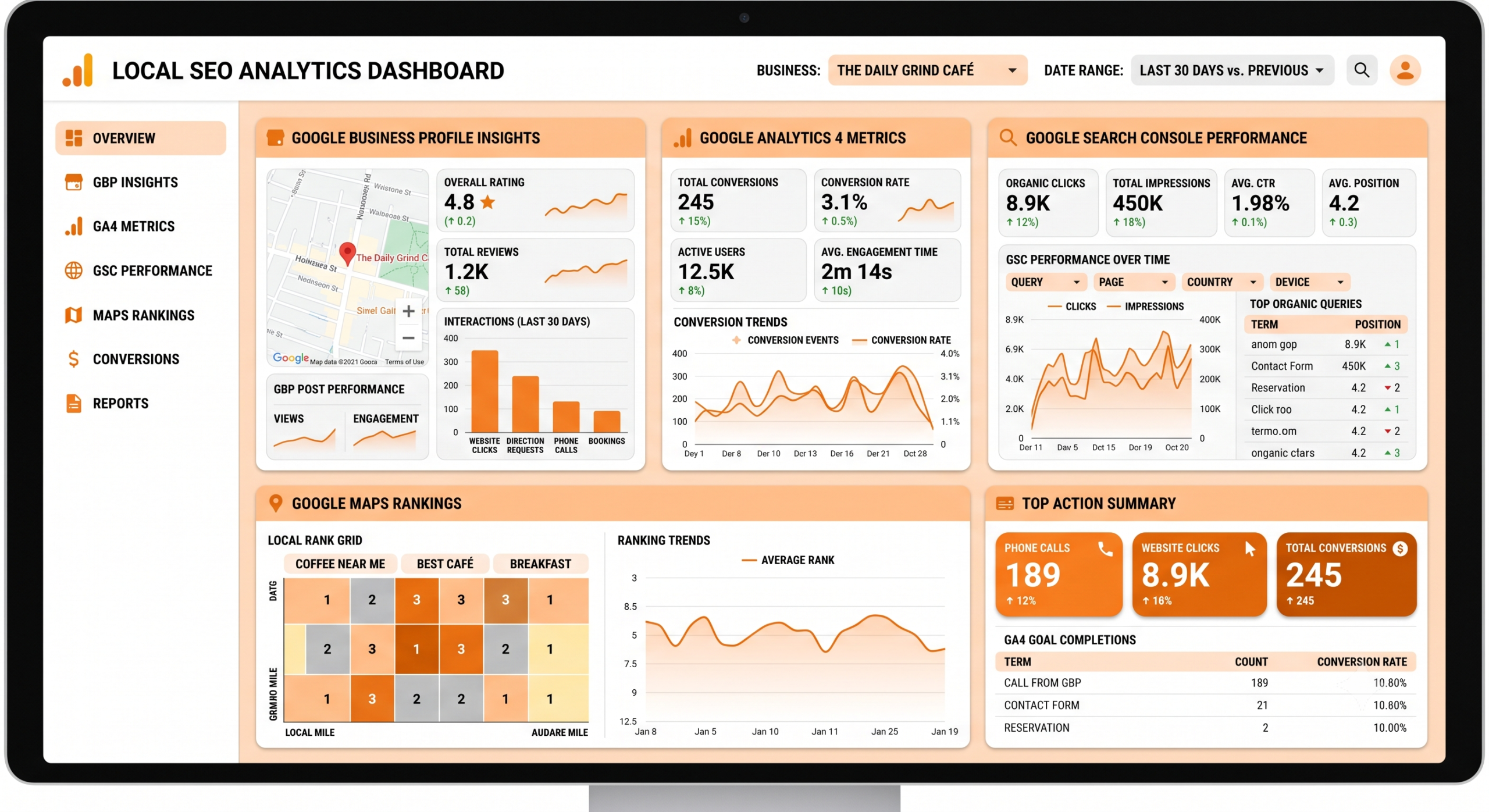
Looker Studio allows you to combine data from multiple sources into one reporting dashboard.
Include visualizations for:
- Google Business Profile
- GA4
- Search Console
- Keyword rankings
- Conversion metrics
This creates a single source of truth for clients and stakeholders.
How to Build a Local SEO Dashboard
A reporting dashboard should answer one simple question:
Is Local SEO helping the business grow?
An effective dashboard includes:
Visibility Metrics
- Google Maps impressions
- Search impressions
- Local keyword rankings
Engagement Metrics
- Website clicks
- Phone calls
- Direction requests
- Review growth
Website Metrics
- Organic sessions
- Bounce rate
- Average engagement time
- Landing page performance
Conversion Metrics
- Leads generated
- Form submissions
- Phone call conversions
- Appointment bookings
Business Metrics
- Cost per lead
- Revenue generated
- Return on investment
- Customer acquisition trends
Reporting business outcomes helps demonstrate the real value of Local SEO.
Monthly Local SEO Reporting Process
Follow a consistent reporting process each month.
Step 1
Review Google Business Profile performance.
Identify changes in:
- Visibility
- Calls
- Website visits
- Direction requests
Step 2
Analyze keyword rankings.
Compare:
- Current rankings
- Previous month
- New ranking opportunities
Step 3
Review website analytics.
Identify:
- High-performing pages
- Pages losing traffic
- New conversion opportunities
Step 4
Evaluate customer reviews.
Track:
- Number of new reviews
- Average rating
- Response rate
Review performance should also be monitored using the strategies described in our Review & Reputation Management Guide.
Step 5
Review citation accuracy.
Ensure business information remains consistent across directories.
Learn more in our Local Citation Management Guide.
Step 6
Update optimization priorities.
Use reporting insights to improve:
- Google Business Profile
- Local content
- Service pages
- Technical SEO
- Internal linking
Reporting should always lead to actionable improvements.
Think Beyond Google: Reporting for AI Search
AI-powered search platforms increasingly influence how customers discover local businesses.
While traditional ranking metrics remain important, businesses should also monitor:
- Growth in branded searches
- FAQ page performance
- Knowledge panel visibility
- High-quality content engagement
- Topic cluster performance
- Internal linking effectiveness
Comprehensive reporting helps ensure your content remains useful for both traditional search engines and AI-powered assistants.
Common Local SEO Reporting Mistakes
Avoid these common reporting errors.
- Tracking rankings without measuring conversions
- Focusing only on traffic growth
- Ignoring Google Business Profile performance
- Reporting data without explaining business impact
- Measuring too many metrics instead of focusing on KPIs
- Creating reports without actionable recommendations
- Comparing data over inconsistent time periods
Good reporting explains what happened, why it happened, and what should happen next.
Local SEO Reporting Checklist
Use this checklist each month.
✅ Review Google Business Profile Insights
✅ Monitor local keyword rankings
✅ Analyze Google Analytics 4 performance
✅ Review Google Search Console data
✅ Measure conversions
✅ Track review growth
✅ Audit citation consistency
✅ Update dashboard metrics
✅ Identify optimization opportunities
✅ Create an action plan for the next month
Frequently Asked Questions
How often should Local SEO reports be created?
Monthly reporting provides enough data to identify trends while allowing time for optimization efforts to produce measurable results.
Which metrics are most important?
Focus on metrics that directly impact business growth, including calls, website visits, conversions, keyword rankings, and Google Business Profile performance.
Is ranking #1 the most important goal?
Not always. Higher rankings are valuable, but generating qualified leads, customers, and revenue is the ultimate objective of Local SEO.
Which tools should I use for Local SEO reporting?
A complete reporting setup typically includes Google Business Profile Insights, Google Analytics 4, Google Search Console, and Looker Studio.
Final Thoughts
Local SEO reporting turns marketing activity into measurable business outcomes. By tracking the right KPIs, using reliable reporting tools, and acting on performance insights, businesses can continuously improve their local search visibility and maximize their return on investment.
Reporting should never end with a spreadsheet. Every report should answer three questions:
- What improved?
- What needs attention?
- What actions should be taken next?
When combined with Google Business Profile Optimization, Local Keyword Research, Local Citation Management, and Review & Reputation Management, reporting becomes the foundation of a sustainable Local SEO strategy.
These guides work together to strengthen your Local SEO Services page and reinforce the authority of your What Is Local SEO? The Complete Guide (2026) pillar article, creating a comprehensive knowledge hub for users and AI search engines alike.