Google SEO Marketing: A Practical Guide to Improving Website Rankings
By the EarnEdge Team
If you run a website, a blog, or an online business, you have probably wondered why some pages sit at the top of Google while others are never found. The answer is search engine optimization (SEO). When SEO is used as a deliberate marketing effort to earn visits from Google without paying for every click, it is often called Google SEO marketing.
This guide is a practical, beginner-friendly walkthrough built on Google’s own SEO Starter Guide. You will learn how Google SEO works, how to research keywords, how to optimize your pages, which technical checks matter, how to build authority, and how to measure your results. Along the way we answer the questions beginners ask most often.
A quick note on the phrase itself: “Google SEO marketing” is a broad term. People use it to mean SEO for Google Search, SEO marketing strategies in general, or Google SEO services. This article focuses on the first two. Our goal is to help you understand and implement SEO yourself, not to sell you an agency package.
What Is Google SEO Marketing?
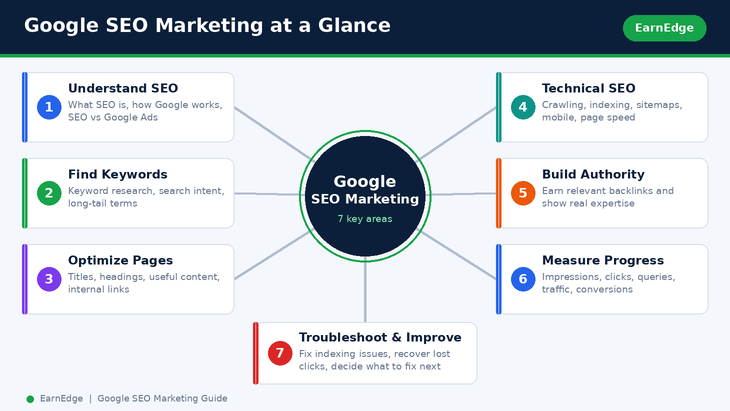
Google SEO marketing is the practice of improving your website so that Google Search can find it, understand it, and show it to people who are searching for what you offer. It combines three things: useful content, a technically healthy website, and a trustworthy reputation. The reward is organic search traffic, meaning visitors who arrive from unpaid search results.
How SEO marketing works
SEO marketing starts with a simple idea: people type questions and phrases into Google, and Google tries to show the most helpful pages in response. Your job is to make your pages the most helpful answer for the searches that matter to your audience.
In practice that means:
- Finding the words and questions your audience actually uses (keyword research).
- Creating pages that fully answer those questions (content and on-page SEO).
- Making sure Google can crawl, index, and understand those pages (technical SEO).
- Earning mentions and links from other trusted websites (off-page SEO and authority).
- Checking what works and improving it over time (measurement).
If you are a beginner with no coding knowledge, do not worry. Most of these steps can be done with a content management system such as WordPress and a few free tools from Google.
Organic search vs. Google Ads
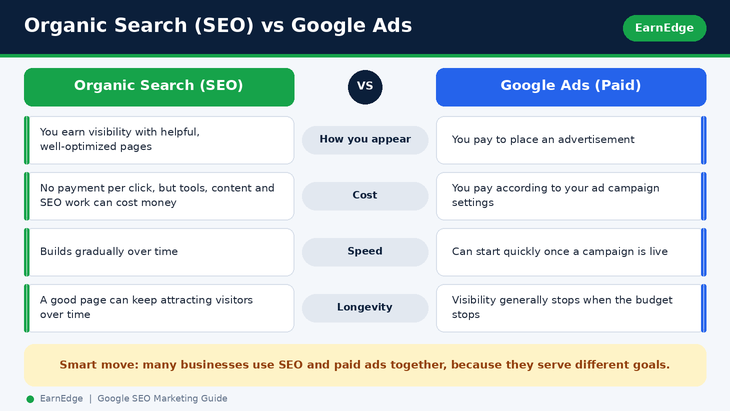
This is one of the most common points of confusion. Google shows two broad kinds of results:
| Organic search (SEO) | Google Ads (paid search) | |
|---|---|---|
| How you appear | You earn visibility by creating helpful, well-optimized pages | You pay to place an advertisement |
| Cost model | No payment per click, although tools, content, and SEO work can cost money | You pay according to your ad campaign settings |
| Speed | Usually builds gradually | Can start quickly once a campaign is live |
| Longevity | A good page can keep attracting visitors over time | Visibility generally stops when the budget stops |
So, is SEO free? Appearing in organic results does not require paying Google per click, but SEO is not effortless. You will invest time, and possibly money in tools, writers, or specialists. Many businesses use SEO and paid ads together, because they serve different goals.
Why Google visibility matters
Search is often where a customer’s journey begins. When someone is ready to learn, compare, or buy, they search. If your site appears for those searches, you meet people at the moment of need. For small businesses, startups, bloggers, and ecommerce stores, organic visibility is one of the most sustainable ways to grow, because well-made content can keep working long after it is published. SEO is still useful for small businesses precisely because it rewards quality and relevance, not just budget.
How Google Search Works
You do not need to be an engineer to understand the basics. Knowing how Google processes the web helps you make better decisions.
Crawling, indexing, and ranking
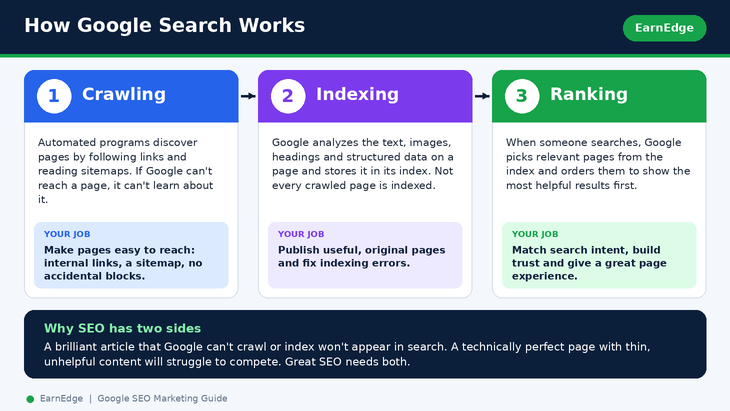
Google’s process has three broad stages:
- Crawling. Automated programs discover pages by following links and reading sitemaps. If Google cannot reach a page, it cannot learn about it.
- Indexing. Google analyzes what is on the page (text, images, headings, structured data) and stores it in a huge database called the index. Not every crawled page is indexed.
- Ranking. When someone searches, Google selects relevant pages from the index and orders them using many signals, aiming to show the most helpful results first.
This is why SEO has both a content side and a technical side. A brilliant article that Google cannot crawl or index will not appear in search. A technically perfect page with thin, unhelpful content will struggle to compete.
What influences search visibility
No one outside Google can give you a complete, exact list of ranking factors, and anyone who promises one is overselling. What is well supported by Google’s own guidance is that the following areas matter:
- Helpful, people-first content that satisfies the search intent behind a query.
- Clear, descriptive page elements such as titles, headings, and link text.
- Crawlability and indexability, so Google can access and store your pages.
- A good page experience, including mobile usability and speed.
- Authority and trust, supported by relevant links and credible, original information.
When people ask what affects Google rankings, the honest answer is a combination of relevance, quality, accessibility, and reputation, working together.
How to Research Keywords for Google SEO
Keyword research is the foundation of SEO marketing. It tells you what your audience is searching for, in their own words, and helps you decide what to write.
Find primary, secondary, and long-tail keywords
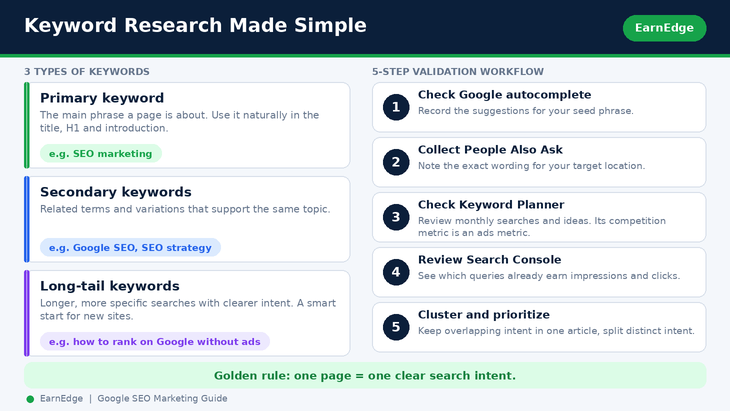
- Primary keyword: the main phrase a page is about. It should match the page’s real topic and the kind of results Google already shows. Use it naturally in the title, the H1, and the introduction.
- Secondary keywords: closely related terms and variations that support the same topic. They belong in subheadings and explanations where they fit naturally.
- Long-tail keywords: longer, more specific searches such as “how to get on the first page of Google without ads”. They usually have clearer intent and can be easier to win, especially for new websites. Long-tail keywords are often a smart place to begin, but they are not automatically better in every case.
For this topic, a sensible set of candidates looks like this:
| Keyword | Role |
|---|---|
| google seo marketing | Broad seed phrase |
| SEO marketing | Alternative primary keyword |
| Google SEO | Closely related core keyword |
| SEO for Google | Natural variation |
| how to improve Google rankings | Informational long-tail keyword |
| Google SEO strategy | Informational supporting keyword |
| search engine optimization marketing | Semantic variation |
| website SEO optimization | Supporting keyword |
Before you commit to a primary keyword, test these alternatives in Google Keyword Planner or a tool such as Ahrefs or Semrush. Search volume and difficulty for any specific phrase should be verified with those tools, not guessed.
How many keywords should one page target? Think in terms of one topic per page, not one keyword per page. A single well-written article can naturally cover a primary keyword plus many related terms when their search intent overlaps.
Match keywords to search intent
Search intent is the reason behind a search. Before you write, search your target phrase on Google and study the first-page results. Ask:
- Are the results guides, product pages, tools, or videos?
- Do they answer a question, compare options, or help someone buy?
- What subtopics do all the top results cover?
If a phrase leads mostly to how-to guides, a how-to guide is what Google believes people want. Match that intent instead of forcing a different format. This is also why commercial phrases such as “SEO services pricing” or “hire an SEO expert” belong on a service page, while educational phrases like “how does Google SEO work” belong in a blog.
Use Google Search Console and keyword tools
Here is a simple workflow for validating your keywords:
- Check Google autocomplete. Type your seed phrase, such as google seo marketing, Google SEO, and SEO marketing, and record the suggestions.
- Collect People Also Ask questions. Search the phrase on Google with your target location set (for example India), expand the questions, and note the exact wording.
- Check Google Keyword Planner. Review average monthly searches and related ideas. Remember that its competition metric is mainly an advertising measure, not an organic SEO difficulty score.
- Check Google Search Console. For an existing site, look at the queries that already bring impressions, clicks, and positions. These are often more actionable than any generic list.
- Cluster and prioritize. Compare first-page results for similar keywords. Keep them in one article when the intent overlaps, and plan separate articles when searchers need distinctly different answers.
Other useful research angles include competitor keyword analysis (see what similar sites rank for), question-based keywords, and keyword clustering to group related terms into topic clusters. If you want to find keywords a website already ranks for, Search Console is your best free source.
How to Optimize Website Content for Google
On-page SEO is everything you control directly on the page. The guiding principle from Google is simple: create useful, people-first content, and describe it clearly.
Improve titles, headings, URLs, and descriptions
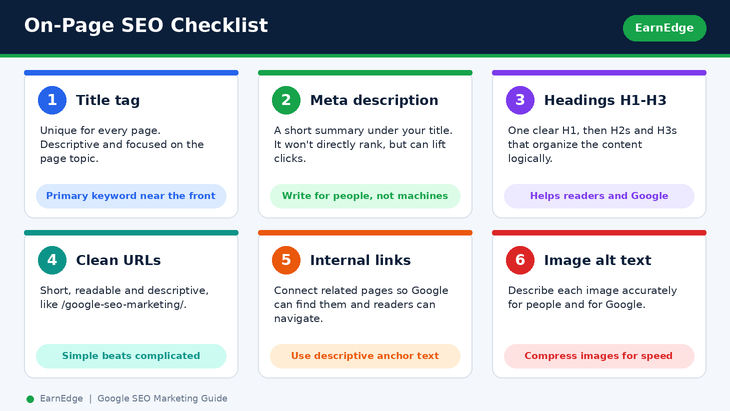
- Title tag: The clickable headline in search results (Google’s title link guidance). Make it unique for every page, descriptive, and focused on the page topic. Place the primary keyword naturally near the front where it reads well.
- Meta description: A short summary that can appear under the title (how Google uses snippets). It does not directly make you rank, but a clear, compelling description can improve your organic click-through rate. Write it for people, not machines.
- Headings (H1, H2, H3): Use one clear H1 that states the page topic, then H2s and H3s to organize the content logically. Headings help both readers and search engines understand structure.
- URLs: Keep them short, readable, and descriptive, for example /google-seo-marketing/.
- Meta keywords tag: Google Search does not use it, so do not spend time on it.
Do title tags and meta descriptions affect SEO? Title tags are an important signal for understanding a page and often shape what appears in results. Meta descriptions mainly influence whether people click.
Create useful, search-intent-aligned content
Good SEO content answers the question completely, clearly, and honestly. To get there:
- Start with the questions your audience asks and answer them directly.
- Cover the subtopics that top-ranking pages cover, then add something original: an example, a lesson from experience, data, or a clearer explanation.
- Write in natural language. Include the different words people use for the same idea.
- Never stuff keywords. Repeating a phrase unnaturally harms readability and goes against Google’s guidance.
- Update content when it becomes outdated. How often depends on your topic, but keeping important pages accurate and current is good practice.
Does word count affect rankings? No. Google says there is no minimum or maximum length that guarantees rankings. Write as much as the topic genuinely needs. A short, precise answer can outrank a long, padded one.
To structure content for featured snippets, use clear question-style headings followed by concise, direct answers, and use lists or tables where they make the information easier to scan.
Improve internal linking and image descriptions
- Internal links connect your pages to each other. They help Google discover content, understand how topics relate, and help readers navigate. Use descriptive anchor text such as “our guide to technical SEO” instead of “click here”. Yes, internal linking helps SEO.
- Image alt text describes an image for people who cannot see it and helps Google understand it. Write short, accurate descriptions. Follow Google’s image best practices and compress images so they load quickly.
- Product and ecommerce pages: Give each product page a unique title, a helpful description written in your own words, clear images, and internal links to related items.
Technical SEO Checks That Help Google Understand Your Site
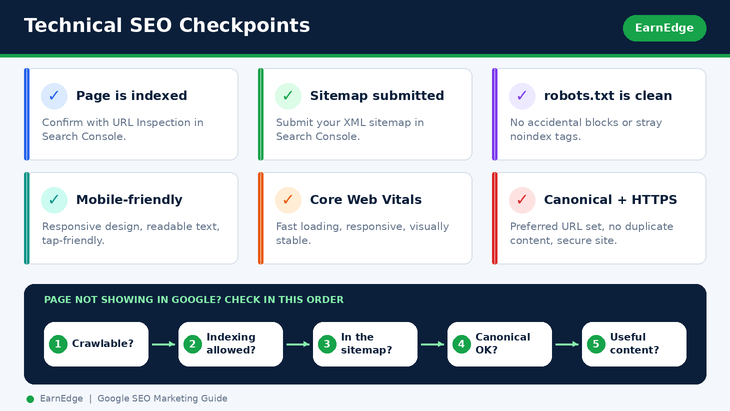
Technical SEO makes sure Google can access, read, and trust your pages. These checks are the first thing to review if your website is not appearing in search results.
Indexing, sitemaps, and robots.txt
- Check whether a page is indexed. In Google Search Console, use the URL Inspection tool to see whether Google has indexed a page and whether it can access it. A quick search for site:yourdomain.com can also give a rough view.
- Request indexing. After publishing or updating an important page, you can ask Google to crawl it through URL Inspection. This is a request, not a guarantee.
- Submit an XML sitemap. A sitemap lists the pages you want Google to find. Submit it in the Sitemaps report in Search Console. This is the practical answer to how to submit your website to Google.
- Review robots.txt. A robots.txt file tells crawlers which areas they may or may not visit. A single wrong line can block important pages, so check that it is not blocking content you want indexed.
- Look for noindex. If a page carries a noindex instruction, Google will keep it out of search. This is the correct way to prevent indexing when you want to, and a common accidental cause of missing pages.
- Fix crawl errors. Use the Pages (indexing) report in Search Console to see which pages are not indexed and why, then fix the underlying cause.
If you are asking why Google is not showing your website, work through this order: Is the page crawlable? Is indexing allowed? Is it in a sitemap? Are there canonical or duplicate content problems? Is the content genuinely useful and different from what already exists?
Mobile experience and Core Web Vitals
Most searches now happen on phones, so a mobile-friendly site is essential. Use a responsive design, readable text, and tap-friendly buttons. Core Web Vitals measure real-world page experience, including loading speed, responsiveness, and visual stability. To improve them:
- Compress and properly size images.
- Remove unnecessary scripts and heavy plugins.
- Use reliable hosting and caching.
- Make sure the layout does not jump around while loading.
Does page speed affect SEO? A fast, stable page gives visitors a better experience, and page experience is part of Google’s guidance. It will not rescue weak content, but a slow site can hold good content back. Also serve your site over HTTPS.
Canonical tags and duplicate content
When similar or identical content is reachable at more than one URL, Google has to choose which version to show. A canonical tag tells Google your preferred version. Fix duplicate title tags, avoid publishing near-identical pages, and keep a logical website architecture so that important pages are only a few clicks from the homepage. Structured data (schema markup) can also help Google understand what a page is about, such as an article, product, or FAQ.
How to Build Website Authority
Authority is the reputation your site earns over time. It is shaped by who references you and how trustworthy your content is.
Earn relevant, quality backlinks
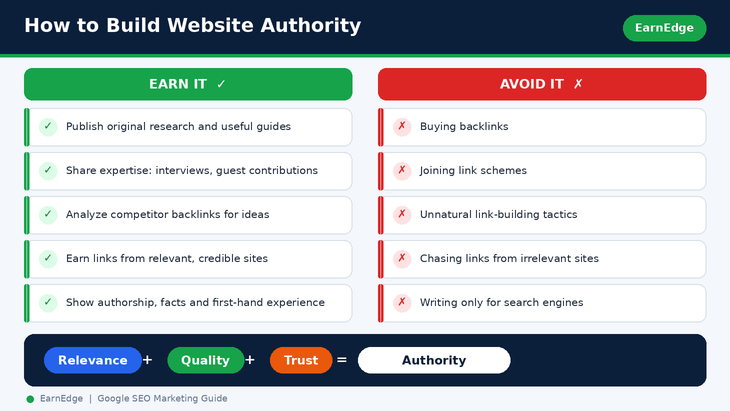
Do backlinks help Google rankings? Links from relevant, reputable websites can be a strong signal that your content is valuable. The key word is earn. Helpful ways to do that:
- Publish original research, useful tools, templates, or clear guides that people want to cite.
- Analyze competitor backlinks to see which sites link to similar content, and why.
- Share your expertise through guest contributions, interviews, and partnerships where it truly adds value.
- Evaluate a link’s quality by its relevance, the credibility of the site, and whether it appears naturally within useful content.
Avoid buying links or joining link schemes. Unnatural link-building practices can lead to problems, and they are the opposite of sustainable SEO. Can SEO work without backlinks? Yes, especially for low-competition topics, but for competitive searches, earned links usually help. Do external links you place on your own pages affect performance? Linking out to useful, relevant sources is good for readers and is a normal part of quality content.
Demonstrate expertise and trustworthiness
Brand mentions, clear authorship, an about page, honest contact details, accurate facts, and first-hand experience all build credibility. Show who wrote the content, why they are qualified, and where facts come from. Trust is built page by page, and it is the base on which link earning and rankings grow.
How to Measure Google SEO Performance
SEO is only useful if you can tell whether it is working. Two free Google tools do most of the job: Google Search Console and Google Analytics.
Track clicks, impressions, and search queries
Google Search Console shows how your site performs in Google Search. The Performance report gives you:
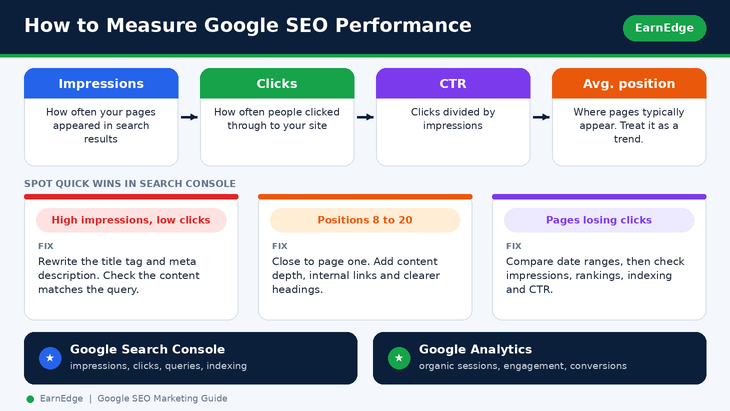
- Impressions: how often your pages appeared in search results.
- Clicks: how often people clicked through to your site.
- Click-through rate (CTR): clicks divided by impressions.
- Average position: where your pages typically appear.
- Queries and pages: which searches and which URLs produce those numbers.
This is how to check your Google ranking for free, and it is the best answer to how to track SEO progress for a new website. Keep in mind that rankings vary by location, device, and personalization, so treat average position as a trend, not an exact number.
Measure organic traffic and conversions
Google Analytics shows what visitors do after they arrive. Look at organic search sessions, engagement, and conversions such as sign-ups, enquiries, downloads, or sales. Traffic alone is not success. A smaller number of visitors who take action is more valuable than a large number who leave immediately. Compare periods, such as month over month, and annotate big changes like site updates.
Identify pages that need improvement
Search Console can point you to quick wins:
- High impressions, low clicks: the page ranks but is not tempting. Improve the title tag and meta description, and check whether the content matches the query.
- Pages losing clicks: compare date ranges to find pages with a falling trend, then investigate whether impressions, rankings, indexing, or CTR changed.
- Queries in positions 8 to 20: these pages are close to page one and often benefit from better content depth, internal links, or clearer headings.
- Unindexed pages: use the indexing reports to find and fix pages Google is not storing.
A basic Google SEO audit checklist
Run this simple audit every quarter, or after major changes:
- Confirm your important pages are indexed.
- Check your sitemap is submitted and error-free.
- Review robots.txt and noindex tags for accidental blocking.
- Look for duplicate titles, missing descriptions, and canonical issues.
- Test mobile usability and Core Web Vitals.
- Review your top queries and pages in Search Console.
- Find pages with high impressions but low clicks.
- Check internal links and fix broken ones.
- Review backlinks and look for harmful or unnatural patterns.
- Decide what to fix first, starting with problems that block indexing, then content gaps, then polish.
Troubleshooting: Why Has My Organic Traffic Dropped?
When traffic falls, work through the funnel in order instead of guessing:
- Did impressions fall? Then visibility has dropped. Check rankings, indexing, seasonality, and whether competitors have published stronger content.
- Did impressions stay stable but clicks fall? Then CTR has dropped. Review your titles, descriptions, and how results look in search.
- Did specific pages disappear from the index? Look for noindex tags, robots.txt blocks, canonical changes, or server errors.
- Did something change on the site? Migrations, redesigns, and URL changes are common causes.
Start by finding out exactly which queries and pages changed, then fix the cause, not the symptom.
Common Google SEO Marketing Mistakes
Keyword stuffing and search-engine-first content
Writing for algorithms instead of people is the most common beginner mistake. Repeating a keyword unnaturally, or writing a page only because a keyword exists, produces content nobody enjoys. Write for the reader first, then check that your structure and wording are clear to search engines.
Technical problems and weak content
- Blocking important pages in robots.txt or leaving noindex tags in place.
- Publishing duplicate or near-duplicate pages.
- Ignoring mobile usability and slow loading.
- Using vague titles and descriptions, or copying them across pages.
- Publishing thin content that adds nothing new to what already exists.
- Targeting commercial keywords with a blog, or informational keywords with a sales page.
- Buying links instead of earning them.
Expecting immediate ranking results
How long does SEO take to work? There is no fixed answer. Results depend on your site’s age and authority, the competition for your topic, the quality of your content, your technical health, and how consistently you implement improvements. Some changes, such as fixing an indexing problem, can show effects quickly. Building authority for competitive terms usually takes months of steady work. Treat SEO as a long-term investment, and track progress with leading signals such as impressions and indexed pages before expecting traffic and conversions.
SEO for Different Types of Websites
The principles are the same everywhere, but the emphasis changes:
- Small business websites: focus on clear service or product pages, helpful answers to local and customer questions, and consistent contact information.
- Beginners with no coding knowledge: use a CMS with an SEO plugin, follow the on-page checklist above, and rely on Search Console for diagnostics.
- WordPress websites: choose a fast theme, keep plugins lean, set clean permalinks, and use a plugin to manage titles, descriptions, and sitemaps.
- Shopify stores and ecommerce product pages: write unique product descriptions, structure categories logically, use structured data for products, and link related items.
- Startups: pick a small set of topics where you have real expertise, and build depth before breadth.
- B2B websites: target problem-focused, decision-stage questions and support them with case studies and original insights.
- Indian businesses: research keywords with your target location set to India, consider the languages your customers search in, and optimize for mobile-first behavior.
- Newly launched websites: start with technical foundations, submit a sitemap, and target specific long-tail topics before competing for broad terms.
- Websites with low organic traffic: audit indexing and intent matching first, then improve underperforming pages before creating new ones.
Do not force all of these phrases into one article. When a search is distinct enough to deserve its own answer, give it its own page and link the pages together.
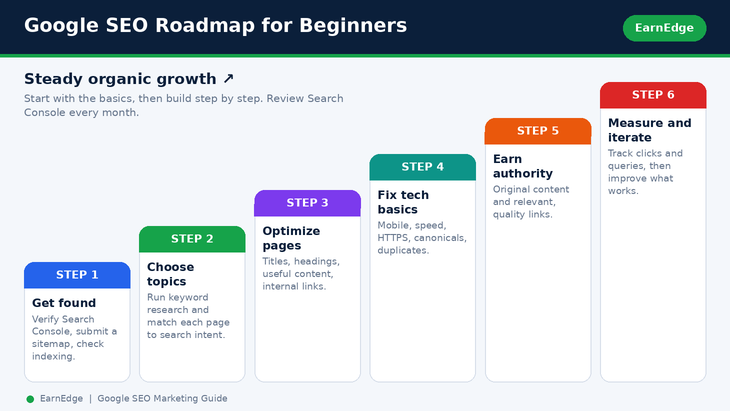
The Google SEO Marketing Roadmap: Where to Start
If you are a beginner, here is a simple order of priorities:
- Make sure Google can find you. Verify your site in Search Console, submit a sitemap, and check indexing.
- Choose your topics. Run keyword research and pick searches you can genuinely answer.
- Create or improve your pages. Optimize titles, headings, content, and internal links around search intent.
- Fix technical basics. Mobile usability, speed, HTTPS, canonical tags, and duplicate content.
- Earn authority. Publish original, citable content and build relationships.
- Measure and iterate. Review Search Console monthly, then double down on what works.
Ready to put this roadmap to work?
EarnEdge helps website owners turn SEO fundamentals into steady organic growth, from keyword research and technical fixes to content that earns its place on Google. Talk to the EarnEdge team about your website and get a clear starting plan.
How Google SEO Marketing Fits Together: The Query Fan-Out
One search rarely stands alone. When someone searches google seo marketing, they actually need answers to a set of related questions. Understanding this “query fan-out” helps you create content that satisfies the whole need.
| Branch | Parent question | Related questions to answer |
|---|---|---|
| SEO fundamentals | How does Google SEO work? | What is crawling? What is indexing? How are results ranked? |
| Keyword research | How do I find SEO keywords? | How do I identify search intent? Which long-tail keywords match my content? |
| On-page SEO | How do I optimize a web page? | How should titles, headings, content, and internal links be optimized? |
| Technical SEO | Why is Google not indexing my page? | Is it crawlable? Is indexing allowed? Is a sitemap available? Are there canonical issues? |
| Authority | How do backlinks help SEO? | How do I earn relevant links? How can I evaluate link quality? |
| Measurement | How do I measure Google SEO results? | Which queries gain clicks? Which pages get impressions but few clicks? |
| Troubleshooting | Why has organic traffic decreased? | Did impressions, rankings, indexing, or CTR change? |
| Implementation | How do beginners start SEO? | What should I check first? How should I prioritize fixes? |
Prioritize the branches whose searches return overlapping results and satisfy the same reader need. Not every branch has equal search demand, so validate them with real data.
Frequently Asked Questions About Google SEO Marketing
What is Google SEO marketing?
It is the practice of improving your website so Google can find, understand, and show it for relevant searches, in order to earn organic (unpaid) traffic. It differs from paid advertising because you do not pay per click for organic listings.
How does Google SEO work?
Google crawls the web to discover pages, indexes the content it finds, and ranks pages when someone searches, aiming to show the most helpful, relevant results. SEO makes your pages easy to crawl and index, and genuinely useful to searchers.
How do I improve my website ranking on Google?
Make your site technically accessible, create useful content that matches search intent, optimize titles, headings, and internal links, build authority through earned links and trust signals, and keep measuring and improving using Search Console.
How long does SEO take to show results?
It varies with your site, competition, implementation, and consistency. Technical fixes can show effects sooner, while competitive rankings generally take longer. Plan for steady, ongoing work.
Is Google SEO free?
Organic listings do not require paying per click, but SEO is not cost-free. You may spend on tools, content creation, or specialist help, and you will certainly spend time.
What is the difference between SEO and Google Ads?
SEO earns visibility in organic results through quality and relevance. Google Ads buys placement in paid results. SEO tends to build gradually and last, while ads can start fast but stop when spending stops.
What is SEO marketing in simple words?
It is making your website easy for Google to understand and valuable for people, so it appears when they search for what you offer.
Can I do SEO myself?
Yes. The fundamentals are learnable, and free tools like Google Search Console cover much of the technical side. You can hire help later if your needs grow.
Is SEO still useful for small businesses?
Yes. Search is where many customers start looking, and quality, relevance, and local focus can let small websites compete in specific niches.
What are the main factors that affect Google rankings?
Relevance to the query, content quality and usefulness, accessibility for crawling and indexing, page experience, and authority and trust all play a role. No one outside Google can give an exact, complete list.
How can I get my website on the first page of Google?
There is no guaranteed method or timeline. Focus on matching search intent better than the pages currently ranking, improving technical health, and earning credibility. Targeting specific long-tail topics first is often realistic for newer sites.
Why is my website not appearing on Google?
Common causes are that the page is not indexed, is blocked by robots.txt or a noindex tag, is missing from your sitemap, has canonical or duplicate issues, or does not yet satisfy search intent. Check the URL Inspection tool first.
How do I find the right keywords for my website?
Start with your audience’s questions, use autocomplete, People Also Ask, Google Keyword Planner, and Search Console, then group related terms and match each group to one page based on intent.
Are long-tail keywords better for SEO?
They are often easier to rank for and clearer in intent, which makes them a great starting point, especially for new websites. They usually have lower individual volume, so the best strategy combines both.
How many keywords should one page target?
Target one main topic per page. One primary keyword plus naturally related variations and questions is enough. Do not force extra phrases in.
How often should I update website content for SEO?
Whenever information becomes outdated or you can make the page clearly more helpful. Important pages deserve periodic reviews, but there is no magic update schedule.
Does word count affect Google rankings?
No. Google states there is no preferred word count that guarantees rankings. Write as much as is needed to fully answer the question.
Do title tags and meta descriptions affect SEO?
Title tags help Google understand and display your page and are worth optimizing. Meta descriptions mainly influence click-through rate, so write them to attract the right readers.
Does Google use the meta keywords tag?
No. Google Search does not use the meta keywords tag, so you can skip it.
How do I know if Google has indexed my website?
Use the URL Inspection tool and the indexing reports in Google Search Console. A site: search gives a rough check.
How do I submit my website to Google?
Verify your site in Search Console, submit an XML sitemap, and use URL Inspection to request indexing for important pages.
Does page speed affect SEO?
Page experience matters. Fast, stable pages serve visitors better and support your SEO, though speed does not replace helpful content.
Is mobile optimization important for Google SEO?
Yes. Most people search on mobile devices, so your site should be fully usable and fast on phones.
Do backlinks help improve Google rankings?
Relevant links from reputable sites are a strong signal of value, particularly for competitive topics. Earn them naturally. Do not buy them.
How do I check my Google ranking for free?
Use the Performance report in Google Search Console to see impressions, clicks, and average position for your queries and pages.
How can I use Google Search Console for SEO?
Use it to verify indexing, submit sitemaps, inspect URLs, find the queries that bring impressions and clicks, and spot pages with high impressions but low clicks.
How do I measure organic search traffic?
Combine Search Console (impressions, clicks, queries) with Google Analytics (organic sessions, engagement, conversions).
What are the most common SEO mistakes beginners make?
Keyword stuffing, ignoring search intent, blocking pages by accident, publishing thin or duplicate content, neglecting mobile and speed, buying links, and expecting instant results.
Can SEO work without backlinks?
For low-competition, specific topics, yes. For competitive searches, earned backlinks usually help considerably.
How can a new website get organic traffic?
Set up Search Console, submit a sitemap, target specific long-tail topics, publish genuinely helpful content consistently, link your pages together, and earn early mentions through helpful, original resources.
Complete Keyword Bank for Google SEO Marketing
Use this reference section to plan related content. These are keyword candidates, not verified search-volume data. Choose the closest topics for each article, and create separate pages when the search intent is clearly different.
Secondary keywords by theme
A. Core SEO marketing
SEO marketing; Google SEO; SEO for Google; Google search engine optimization; search engine optimization marketing; SEO strategy; SEO best practices; SEO techniques; website SEO; organic search optimization; organic search traffic; Google search rankings; website ranking on Google; SEO for beginners; online search visibility.
B. Keyword research and content
SEO keyword research; Google keyword research; Google Keyword Planner for SEO; long-tail keywords; low-competition keywords; keyword search intent; related keywords for SEO; SEO content strategy; keyword mapping; keyword clustering; search query analysis; competitor keyword research; content optimization for Google; SEO blog writing; topical relevance in SEO.
C. On-page SEO
On-page SEO; SEO title tags; meta description optimization; heading tag optimization; H1 tag SEO; URL optimization; internal linking for SEO; image alt text SEO; content optimization; SEO-friendly website content; search intent optimization; duplicate content SEO.
D. Technical SEO
Technical SEO; website crawling and indexing; Google indexing; XML sitemap; robots.txt SEO; Google Search Console; canonical tags; mobile SEO; website loading speed; Core Web Vitals; structured data SEO; website crawlability; index coverage issues; HTTPS and website SEO; website architecture SEO.
E. Off-page SEO and authority
Off-page SEO; link building for SEO; quality backlinks; backlink analysis; website authority; relevant external links; competitor backlink analysis; brand mentions and SEO; link earning strategies.
F. Measurement
Google Search Console SEO; Google Analytics organic traffic; SEO performance tracking; keyword ranking tracking; organic click-through rate; Google Search impressions; organic search conversions; SEO traffic analysis; SEO audit checklist; SEO improvement strategy.
Long-tail keyword clusters
Cluster 1: Google SEO marketing basics
- what is Google SEO marketing
- how does Google SEO marketing work
- how to do SEO marketing on Google
- Google SEO marketing guide for beginners
- how to improve website ranking on Google organically
- how to get my website to rank on Google
- how to rank higher in Google search results
- how to get on the first page of Google without ads
- how to increase organic traffic from Google
- what are the best SEO practices for Google
- how long does SEO take to work on Google
- is SEO marketing free on Google
- can I do Google SEO myself
- difference between SEO marketing and Google Ads
- what affects Google search rankings
- how Google discovers, crawls, and indexes websites
- Google SEO marketing strategy for small businesses
- Google SEO checklist for beginners
Cluster 2: Keyword research and search intent
- how to find keywords for Google SEO
- free keyword research tools for Google SEO
- how to find low-competition keywords for SEO
- how to find long-tail keywords for Google
- how to use Google Keyword Planner for keyword research
- how to choose primary and secondary SEO keywords
- how to identify search intent for SEO keywords
- how to find competitor keywords for Google SEO
- how to group related keywords into topic clusters
- how to research keywords using Google Search Console
- how to find keywords that a website already ranks for
- how to find keyword opportunities for a new website
- how to research keywords for a blog article
- how to prioritize SEO keywords by search intent
- how to find question-based keywords for SEO
Cluster 3: On-page SEO and content optimization
- how to optimize title tags for Google SEO
- how to write meta descriptions for organic search clicks
- how to optimize H1 and H2 headings for SEO
- how to write SEO-friendly blog posts for Google
- how to optimize existing content for Google Search
- how to use internal links to improve website SEO
- how to optimize images for Google Search
- how to use keywords naturally in website content
- how to optimize URLs for search engines
- how to avoid keyword stuffing in SEO content
- how to optimize product pages for Google organic search
- how to improve organic click-through rate in Google
- how to match website content with search intent
- how much content is needed to rank on Google
- how to structure content for featured snippets
- how to write useful content that ranks in Google Search
Cluster 4: Technical SEO and Google indexing
- how to check if a website is indexed by Google
- how to request indexing in Google Search Console
- how to submit an XML sitemap to Google
- how to fix pages that are not indexed by Google
- how to check whether robots.txt blocks Google
- how to fix canonical tag issues in SEO
- how to fix duplicate title tags on a website
- how to improve Core Web Vitals for SEO
- how to optimize page speed for Google Search
- how to improve mobile SEO for a website
- how to fix crawl errors in Google Search Console
- how to use URL Inspection for SEO
- how to prevent Google from indexing a page
- how structured data helps Google understand website content
- how website architecture affects Google rankings
- how to find technical SEO issues on a website
- why Google is not showing my website in search results
- how to check whether Google can access a website page
Cluster 5: Backlinks and off-page SEO
- how to build quality backlinks for Google SEO
- how to earn backlinks without buying links
- how to analyze competitor backlinks
- does internal linking help Google SEO
- how to improve website authority through SEO
- how to evaluate the quality of a backlink
- how to find websites that link to competitors
- how to create content that attracts backlinks
- how to identify harmful or unnatural link-building practices
- do external links affect SEO performance
Cluster 6: Google SEO tools and performance tracking
- how to use Google Search Console for SEO
- how to use Google Analytics to measure organic traffic
- how to track Google keyword rankings
- how to measure SEO success using Google Search Console
- how to find pages losing clicks in Search Console
- how to identify SEO opportunities from search impressions
- how to measure organic conversions from SEO
- how to improve Google search click-through rate
- how to perform a basic Google SEO audit
- how to track SEO progress for a new website
- best free Google SEO tools for beginners
- how to find pages with high impressions but low clicks
Cluster 7: SEO by website or business type
- Google SEO for small business websites
- Google SEO for beginners with no coding knowledge
- Google SEO for WordPress websites
- Google SEO for Shopify stores
- Google SEO for ecommerce product pages
- Google SEO marketing for startups
- Google SEO for B2B websites
- Google SEO marketing for Indian businesses
- Google SEO for newly launched websites
- Google SEO strategy for websites with low organic traffic
Sources and Further Reading
Want to double-check what you have learned or go deeper? These official and industry resources are the best next step.
Official Google resources
- SEO Starter Guide: Google’s own beginner guide to search engine optimization.
- How Google Search works: crawling, indexing, and serving results explained.
- Creating helpful, reliable, people-first content: what Google wants from your content, including its guidance on word count.
- Google Search Console: free tool for indexing, queries, clicks, and impressions.
- URL Inspection tool: check whether Google has indexed a page.
- Build and submit a sitemap
- Introduction to robots.txt
- Consolidate duplicate URLs and canonicals
- Introduction to structured data
- Influencing your title links
- Control your snippets and meta descriptions
- Image SEO best practices
- Mobile-first indexing best practices
- Spam policies for Google web search: including link spam.
- Google does not use the keywords meta tag
- Core Web Vitals on web.dev
Tools for keyword research and measurement
- Google Keyword Planner
- Google Analytics
- Ahrefs and Semrush: third-party tools for validating keyword demand and difficulty.
Conclusion
Google SEO marketing is not a trick or a single tactic. It is a repeatable process: understand what people are searching for, create the most helpful answer, make sure Google can access and understand it, earn trust, and measure what happens. Start with the fundamentals in this guide, focus on one clear search intent per page, and improve steadily. Over time, those small, consistent improvements compound into lasting organic visibility.
Ready to grow your website with SEO?
EarnEdge helps businesses and creators turn strategies like these into real organic growth, with practical, honest, people-first SEO. Whether you need a keyword plan, a technical check-up, or content that ranks, our team is here to help.
Contact EarnEdge today and tell us about your website. And keep learning with more practical guides on the EarnEdge blog.
SEO Details for Publishing (Internal Notes)
Remove this section before publishing.
| Element | Recommendation |
|---|---|
| Working primary keyword | google seo marketing |
| Closely related core term | SEO marketing |
| Supporting terms | Google SEO, SEO strategy, website SEO optimization |
| Question keywords | how Google SEO works; how to improve Google rankings; how to measure SEO |
| Suggested SEO title | Google SEO Marketing: How to Improve Website Rankings |
| Suggested H1 | Google SEO Marketing: A Practical Guide to Improving Website Rankings |
| Suggested URL slug | /google-seo-marketing/ |
| Meta description | Learn how Google SEO marketing works, research keywords, optimize website content, improve technical SEO, and measure organic search performance. |
Keywords to keep out of this blog’s main targeting: Google SEO agency, Google SEO services, SEO company in Ahmedabad, hire an SEO expert, SEO service provider, SEO services pricing. These have stronger commercial intent, so reserve them for your service page to avoid keyword cannibalization between the blog and the service page.
Before finalizing: google seo marketing is a broad, somewhat unnatural phrase, and its real search volume and difficulty are unverified. Check it, along with the alternatives in the keyword table, in Google Keyword Planner or Ahrefs and against the live Google results for India before locking in the primary keyword.