

GA4 Setup for Business: A Practical Measurement Plan
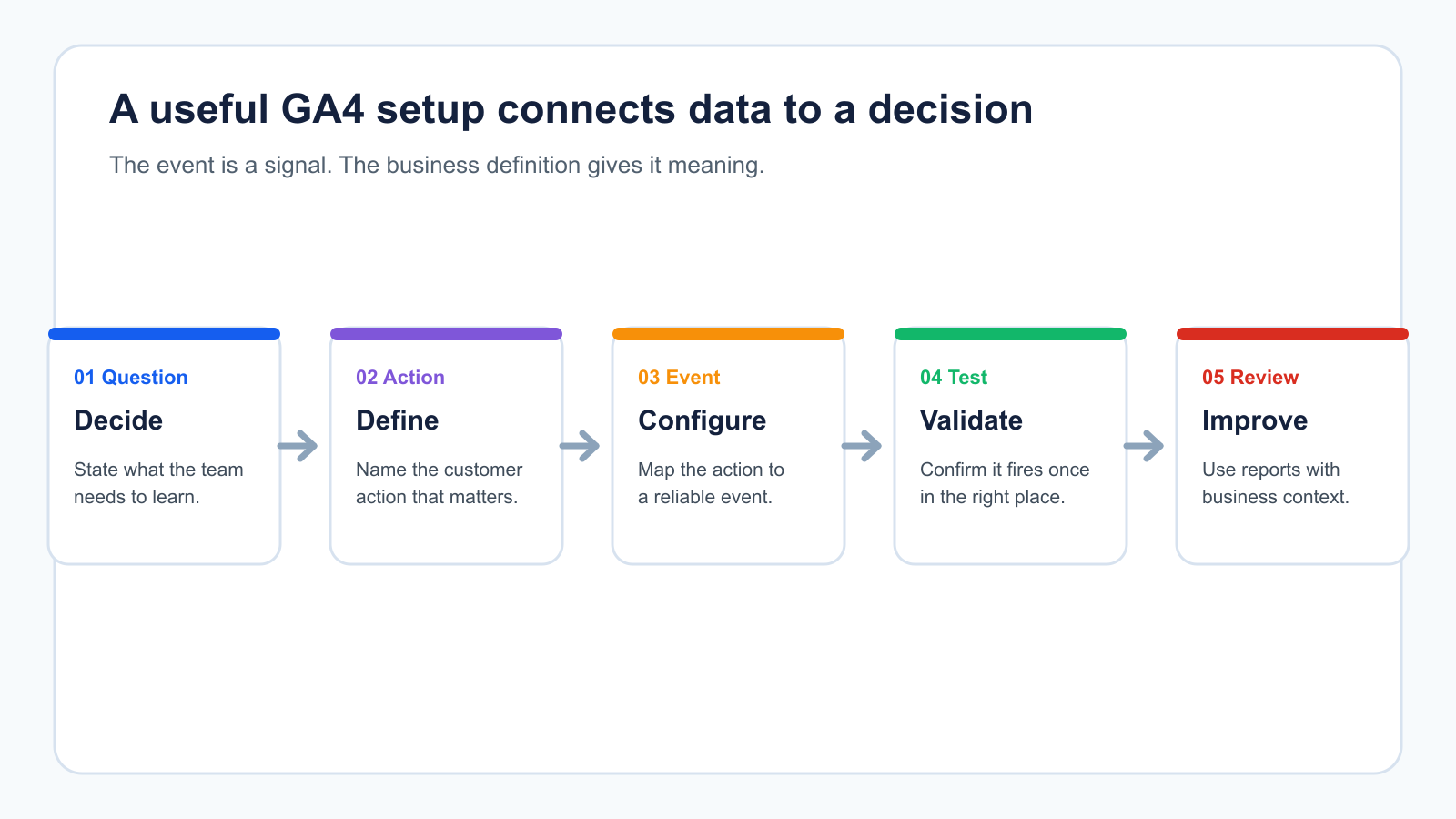
GA4 setup for a business begins with a measurement plan, not a tag alone. A business needs to decide which website actions matter, how those actions relate to a commercial outcome, and who will use the resulting reports. Once those answers are clear, the GA4 property, data stream, events, and reporting can support them.
Google’s GA4 setup guidance describes the core implementation sequence: create a Google Analytics 4 property, add a data stream, and add the Google Analytics code. The technical steps are necessary, but they do not decide what the business should measure.
Define the questions before configuring GA4
Start with the decisions that reporting should inform. A service business may need to distinguish a simple contact-form submission from an enquiry that matches its target customer. An ecommerce business may need to understand which product or checkout interactions need investigation. A B2B team may need to connect website interest with lead review by sales.
Write a short list of questions before implementation:
- Which actions show a visitor has taken a meaningful next step?
- Which fields or systems establish whether that action became a useful lead or sale?
- Which traffic sources and landing pages need to be compared?
- Who checks tracking after a site or campaign change?
This makes the setup easier to test and keeps reporting focused on decisions rather than a long list of unrelated events.
Create the property and data stream carefully
During property setup, choose the right business account, reporting time zone, and currency. Google’s setup documentation notes that a property uses those selections for reporting and that a time-zone change affects data going forward. Confirm these settings before collecting data so reports are interpreted consistently.
Next, add the website data stream and deploy the Google tag through the approved implementation method. Record the property, stream, and implementation owner in the team’s documentation. That record makes future troubleshooting safer when a site, consent configuration, or tag-management container changes.
Earnedge’s analytics and tracking services can help a business turn this setup into a documented measurement plan rather than a one-time installation. Businesses comparing the wider agency scope can also use the growth marketing agency guide to assess how measurement connects with acquisition and conversion work.
Separate automatic measurement from business meaning
GA4 can automatically collect some events when enhanced measurement is enabled. It can also record recommended events that match a specific business action. Google’s recommended events reference includes generate_lead for a submitted lead form or request for information.
An event tells you that a defined action was recorded. It does not, by itself, prove lead quality, sales acceptance, or revenue. Keep the distinction visible in reporting.
| Signal | What it can show | What it cannot show alone |
|---|---|---|
form_start |
A visitor began the form | Whether the form was completed or the visitor was a good fit |
form_submit or generate_lead |
A defined submission was recorded | Whether sales accepted or contacted the lead |
| Purchase or key event | A configured website action occurred | Why a buyer chose that path or the contribution of every earlier interaction |
For a lead-generation business, the B2B lead-generation guide provides a useful companion view: connect the website signal to qualification, routing, and sales feedback before deciding what to optimize.
Build a small event plan
List the events that are necessary to answer your core questions. Include the action, the business meaning, the page or trigger, the owner, and the test method. For example, a lead form may use a generate_lead event after a successful submission, while a telephone link may be tracked only if calls are a meaningful action for that business.
Avoid creating events just because they are technically available. More events can create confusion when no one knows which ones are reliable or decision-useful.
When Google Ads is part of the channel mix, make sure its conversion actions and GA4 events are not treated as interchangeable without a clear reason. Earnedge’s Google Ads management guide explains why conversion definitions and landing-page alignment should be agreed before campaign results are interpreted. For a provider-side view of the implementation scope, read conversion tracking setup services.
Test before using reports for decisions
Use real test actions to confirm that the intended event fires once, appears in the expected property, and carries the right context. Document any known exclusions, consent limitations, cross-domain paths, payment providers, or CRM handoffs. Repeat the check after major changes to forms, website templates, consent tools, or campaigns.
Google Analytics provides DebugView for inspecting event activity during implementation. This is useful for validation, but the wider check still requires a business owner to confirm that the event’s definition matches the real customer action.
Use attribution with the right limitation
Attribution assigns credit to touchpoints on the path to a key event. Google’s attribution overview explains that GA4 has multiple attribution models and that data-driven attribution uses account data. Attribution can inform a channel discussion, but it is not a complete explanation of why a customer bought.
Use attribution reports alongside landing-page quality, lead review, sales context, and changes in demand. Do not use one dashboard number as the only reason to stop, start, or scale a channel.
GA4 setup checklist
- Confirm the business account, property, time zone, and currency.
- Add the data stream and deploy the approved tag implementation.
- Document the actions that matter and their business definitions.
- Configure a small set of appropriate events and key events.
- Test the full path, including forms and confirmation states.
- Document ownership for monitoring and future changes.
- Review reports with the people who can validate lead quality or sales outcomes.




3 Comments